Resubmit Application for Asaan Karobar Card (New Update)
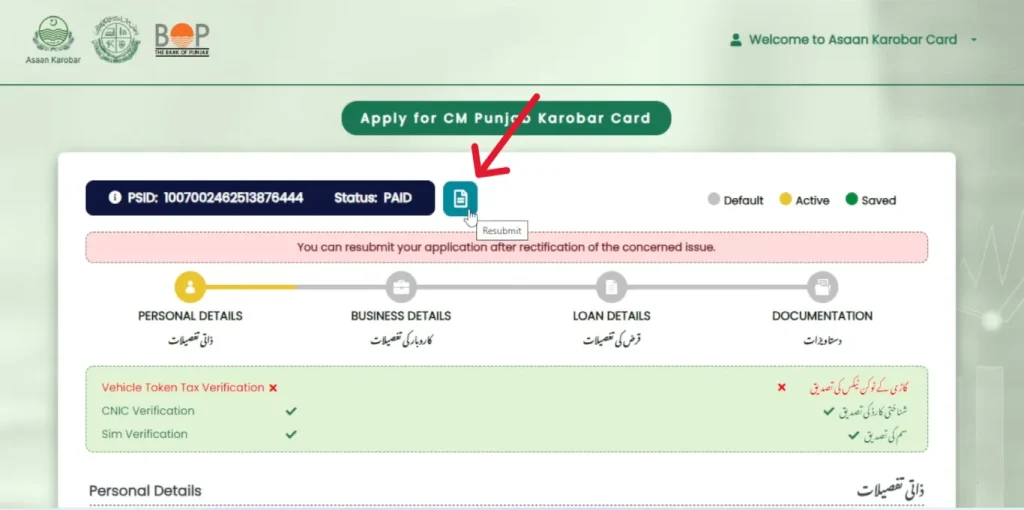
The Asaan Karobar Card (AKC Punjab) is one of the most popular government schemes in Punjab that provides interest-free loans up to PKR 1 million for small businesses. Many applicants have already applied through the akc punjab gov pk login portal.
rnHowever, some people faced issues during their first submission â like incomplete documents, login errors, or verification problems. Ab Punjab Government ne ek new update issue kiya hai: now you can resubmit your application for the Asaan Karobar Card if it was rejected or left incomplete.
rnrnWhy Do You Need to Resubmit?
rnApplicants are asked to resubmit application in the following cases:
rnrn- rn
- rn
Documents not uploaded correctly
rn rn - rn
Wrong or outdated CNIC details
rn rn - rn
Application left âÂÂincompleteâ on portal
rn rn - rn
Failed digital verification or psychometric test
rn rn - rn
Login error at asan karobar card login page
rn rn - rn
Business details mismatch during Urban Unit verification
rn rn
Agar aapka application reject ya incomplete show kar raha hai, to ab aap easily resubmit kar saktay ho with the updated process.
rnrnNew Update for Resubmission
rnAccording to the new guidelines:
rnrn- rn
- rn
Applicants can log in again via the official portal: akc punjab gov pk login
rn rn - rn
Select the option âÂÂResubmit Applicationâ (newly added feature).
rn rn - rn
Update or correct your CNIC, mobile number, or business information if needed.
rn rn - rn
Upload missing or corrected documents (e.g., electricity bill, NTN, rent agreement, etc.).
rn rn - rn
Pay the processing fee (PKR 500) again (if asked).
rn rn - rn
Submit and wait for verification by PSIC / Bank of Punjab team.
rn rn
Steps to Resubmit Application
rnFollow these step-by-step instructions for a smooth process:
rnrn- rn
- rn
Open Website â Go to akc.punjab.gov.pk.
rn rn - rn
Login â Use your CNIC and password (if you forgot password, reset option available).
rn rn - rn
Check Status â If your application is âÂÂRejectedâ or âÂÂIncompleteâÂÂ, you will see a Resubmit Button.
rn rn - rn
Update Info â Correct personal/business details and upload missing documents.
rn rn - rn
Submit â Finalize the application and wait for confirmation SMS/email.
rn rn
Important Points to Remember
rn- rn
- rn
Only applicants with incomplete/rejected applications can resubmit.
rn rn - rn
Aap ko apna CNIC aur registered mobile number use karna zaroori hai.
rn rn - rn
One applicant can apply for only one Asaan Karobar Card.
rn rn - rn
After resubmission, verification will be conducted again by the Urban Unit within 6 months.
rn rn - rn
Ensure your business is registered with PRA/FBR (mandatory after 6 months).
rn rn
Contact for Help
rnIf you face issues during resubmission, you can directly contact:
rnDirector (C&M), Punjab Small Industries Corporation
ð 042-99201432, 042-99203731
ð§ asaankarobar@psic.punjab.gov.pk
Final Thoughts
rnThe new Resubmit Application Update is a big relief for many small business owners who missed their chance earlier. Instead of waiting for months, ab applicants dobara apply karke apna Asaan Karobar Card easily le saktay hain.
rnSo if your first application was rejected or incomplete, login today at asan karobar card login portal and use the resubmit option to secure your interest-free business loan.