Apply Tier 2 PM Youth Business & Agriculture Loan Scheme
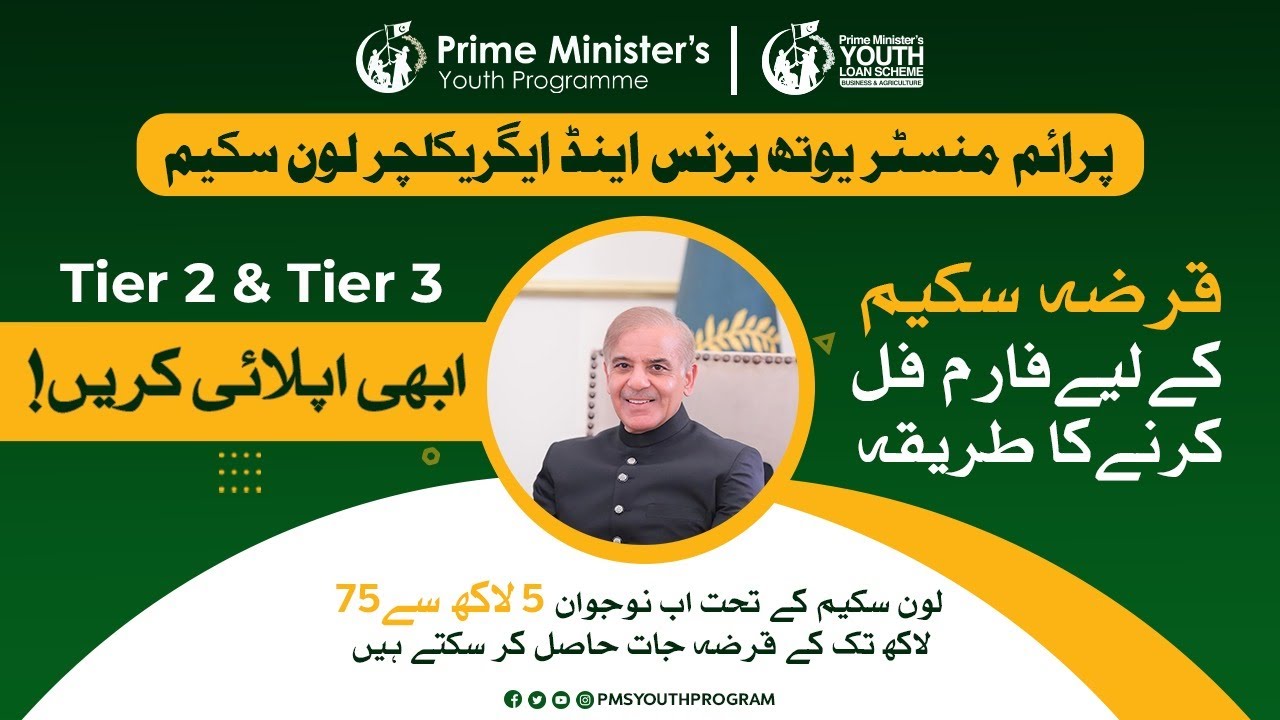
How to Apply Tier 2 PM Youth Business and Agriculture Loan Scheme (PMYB&ALS)rn
rn
rnrn
rnrn
rnrnrnDo you want to apply for a loan of 0.5 million to 1.5 million PKR (5 lacs to 15 lacs)? You can apply Tier 2 PM Youth Business and Agriculture Loan Scheme (PMYB&ALS). The complete application process is given below to apply Tier 2 PM Youth Business and Agriculture Loan Scheme. Please check the required documents below before applying for the Tier 2 loan.Documents Required to Apply Tier 2 PM Youth Business and Agriculture Loan Schemern
rnrn
rn- rn
- ApplicantâÂÂs Picture rn
- ApplicantâÂÂs CNIC Pictures (Front & Back) rn
- FatherâÂÂs/HusbandâÂÂs/GuardianâÂÂs CNIC rn
- Mobile number registered with the applicantâÂÂs CNIC rn
- Utility Bills rn
- Educational Degrees/Documents rn
- Business vehicle registration number and vehicle picture (if you have one) rn
- National Tax number (optional) rn
- Experience certificates (if you have any) rn
- Feasibility reports (optional) rn
Note: Please note that the documents mentioned above are the documents that you should have before starting the application. The other required details are mentioned in their respective sections.
rnrnrn
rnrn
rnrn
rnrn
rnHow to Apply Tier 2 PM Youth Business and Agriculture Loan Scheme (PMYB&ALS)
rnThis process is for the PM Youth Business & Agriculture Loan Scheme (PMYB&ALS) Tier 2 Application. If you want to apply tiers like Tier 1 or Tier 3, please check out their respective articles for application. Below is the application process for the Tier 2 application.rnrn
rnrn- rn
- Click on the âÂÂApplyâ button given below to start the application process. rn
rn
rn- rn
- Click on the âÂÂApplyâ button given below to start the application process. rn
- Enter your 13-digit CNIC number and CNIC issue date, select Tier-2, and click âÂÂEnterâ to start the application. rn
Step 01: Initial Selection
rnrn
rnrn
rnrn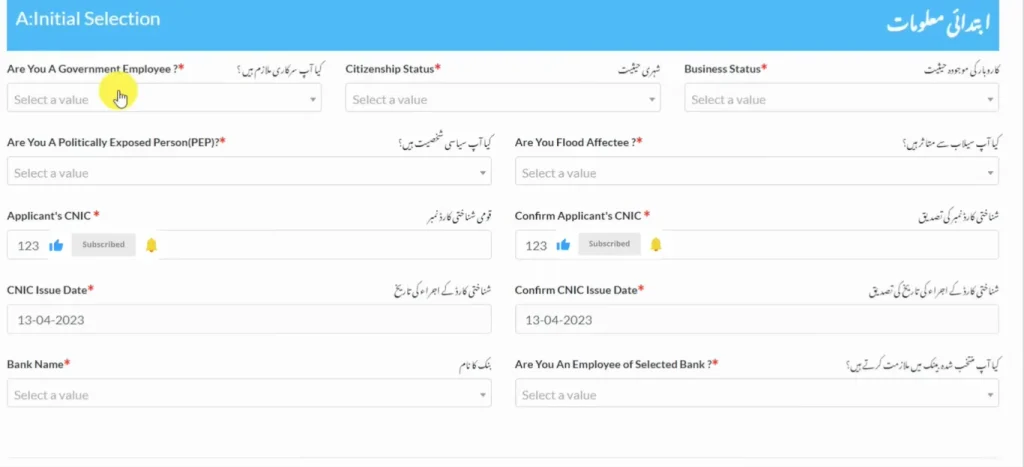 rn
rn
rnrnrn
rn- rn
- In the first step, you will provide basic information. It includes your government employee status, citizenship status, business status, PEP (Politically Exposed Person) status, etc. rn
- After that, you will give details about your CNIC. You will also share the bank you want to use for the PM youth and agriculture loan. Lastly, select your employment status with the bank. rn
- Click âÂÂSubmit and Nextâ to proceed to the next step. rn
Step 02: Personal Information
rnrn
rnrn
rnrn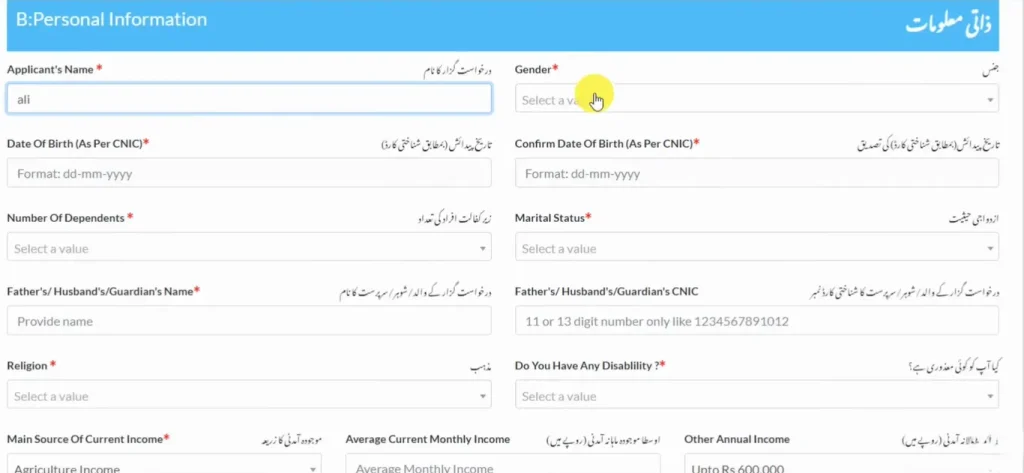 rn
rn
rnrnrn
rn- rn
- In this step, you will provide personal information. You will enter your name, select your gender, marital status, religion, and any disability if you have. rn
- Then you will provide information about your income, bank account, utility bill, consumer ID, and national tax number. rn
- Lastly, you will upload your images along with your CNIC pictures (both front and back). Click âÂÂSubmit and Nextâ to proceed. rn
Step 03: Qualification Details
rnrn
rnrn
rnrn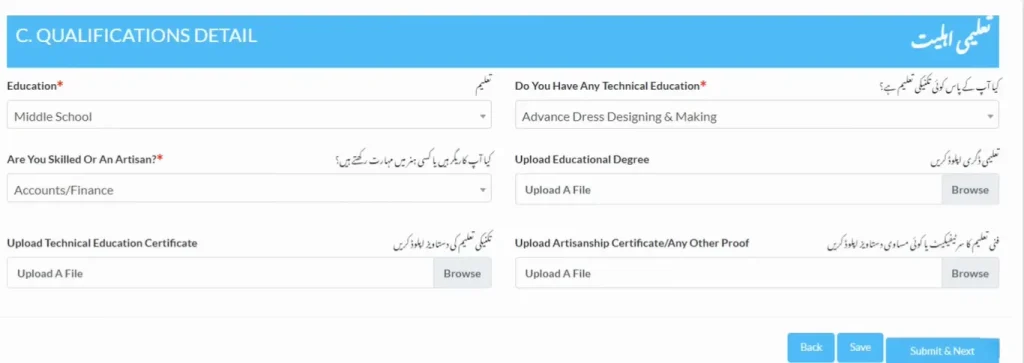 rn
rn
rnrnrn
rn- rn
- In this section, you will provide information about your education, technical education, and artisanship. rn
- After that, you will upload the respective documents of your education. rn
- Click âÂÂSubmit and Nextâ to proceed. rn
Step 04: Contact Details
rnrn
rnrn
rnrn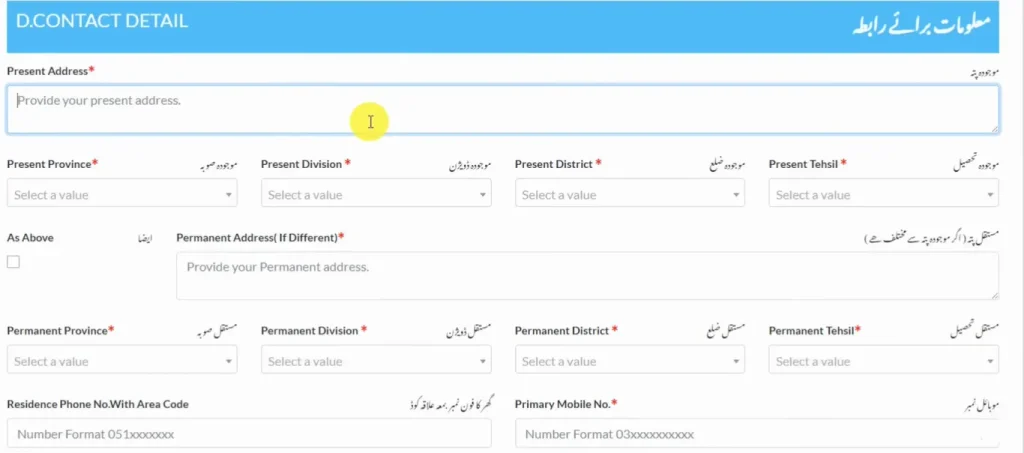 rn
rn
rnrnrn
rn- rn
- In this section, you will provide your current and permanent address. You will put your addresses along with the selection of your district, division, tehsil, and province. rn
- Additionally, you will also provide your mobile number, SIM owner, and details about your residency type. rn
- Save your information and click âÂÂSubmit and Nextâ to proceed to the next section. rn
Step 05: Business Information
rnrn
rnrn
rnrn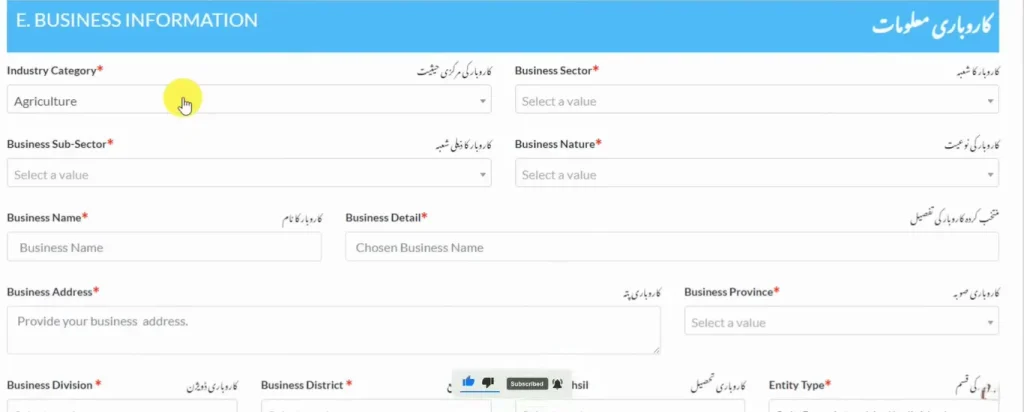 rn
rn
rnrnrn
rn- rn
- In this section, provide details about the business for which you want to get the loan. rn
- Provide information about the business sector, business nature, business name, business details, and address. rn
- Then you will select your business registration status, business utility bill consumer ID, and business national tax number. rn
- Lastly, provide information about any registered vehicles on your business (if any). rn
Step 06: Financing Details
rnrn
rnrn
rnrn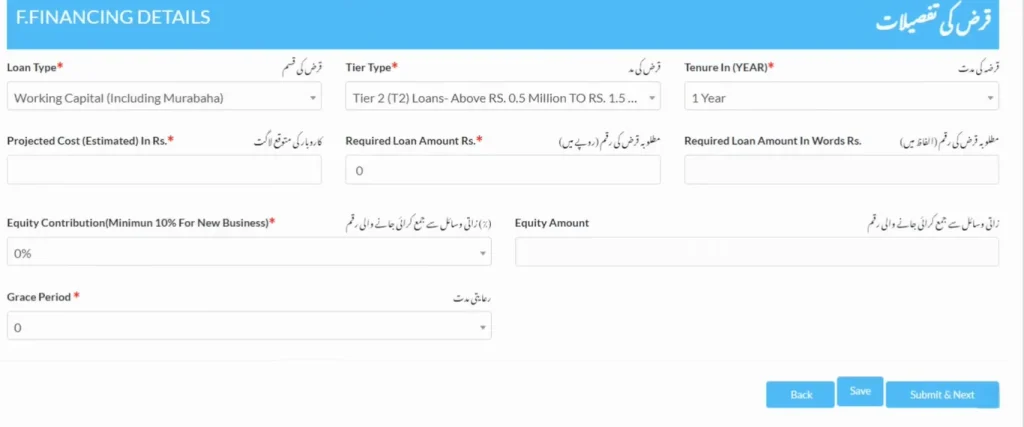 rn
rn
rnrnrn
rn- rn
- In this section, you will provide details about your loan. rn
- You will select your loan type, tier type, tenure, amount, grace period, and equity contribution. rn
- Save and click âÂÂSubmit and Next.â rn
Step 07: Business Plan
rnrn
rnrn
rnrn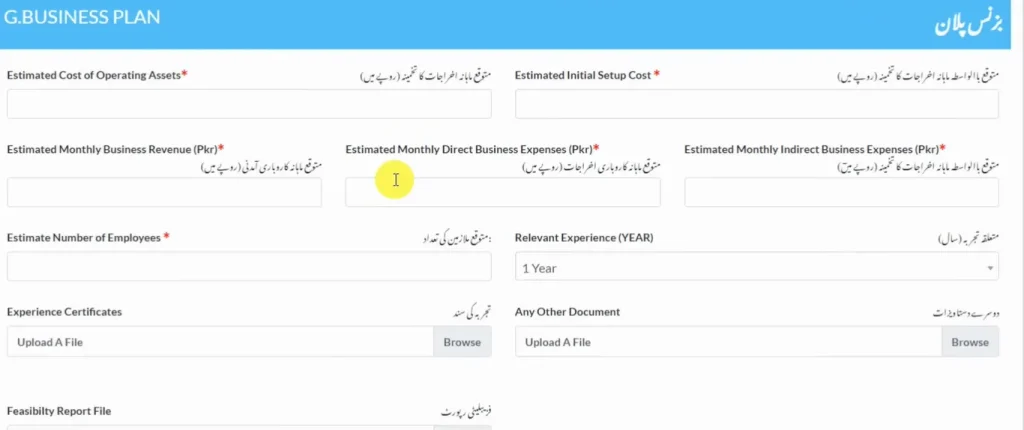 rn
rn
rnrnrn
rn- rn
- In this section, you will provide details about the business plan for which you are applying for the loan. rn
- You will tell about your estimated cost, initial cost, estimated monthly revenue and expenses, and any relevant experience. rn
- Lastly, upload your documents of experience and any other documents if necessary. rn
- Save and click âÂÂSubmit and Nextâ to proceed to the next section. rn
Step 08: Financing History
rnrn
rnrn
rnrn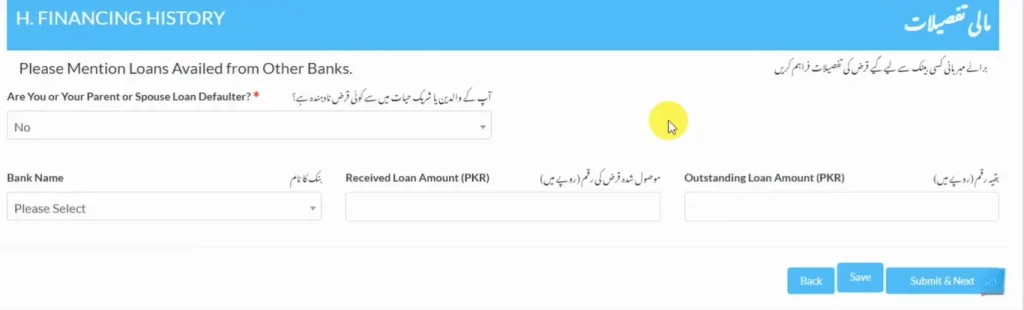 rn
rn
rnrnrn
rn- rn
- In this section, you will provide details about the loans that your father or spouse has availed. rn
- Simply select âÂÂNoâ if not availed, otherwise provide details if they have availed the loan. rn
Step 09: References
rnrn
rnrn
rnrn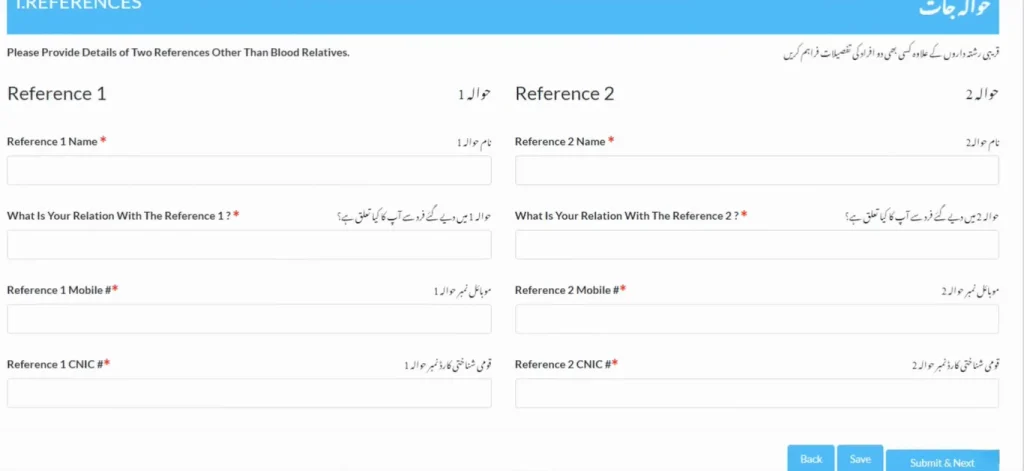 rn
rn
rnrnrn
rn- rn
- In this section, you will provide details of your two references. The references must not be your blood relatives. rn
- You will provide their names, CNIC, mobile number, and your relation with them. rn
- Click âÂÂSave and Next,â and a declaration certificate will pop up. Enter your CNIC details, date of birth, and mobile number. Check the âÂÂTerms and Conditionsâ box and click âÂÂSubmitâ to submit your application successfully. rn
rn
rnrn
rnrn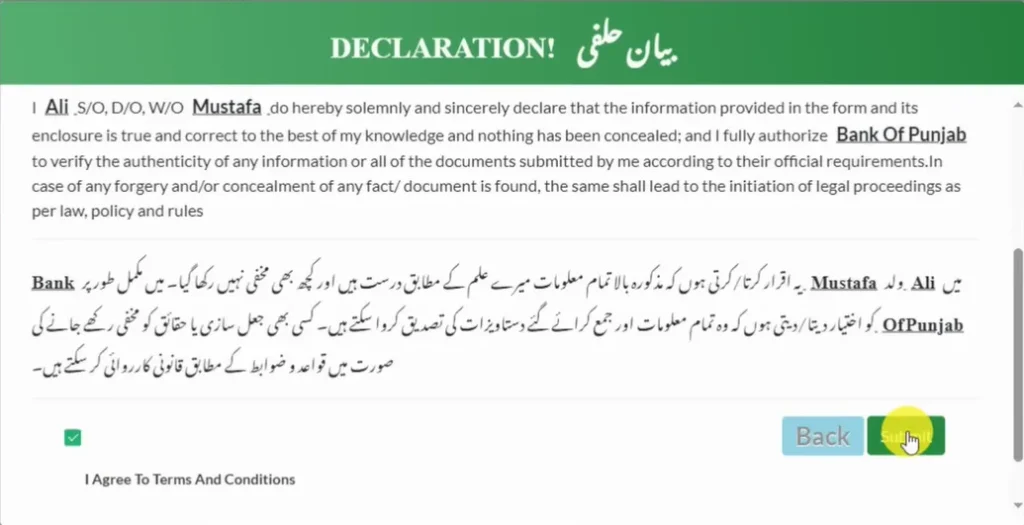 rn
rn
rnrnNote: After applying, you will be further notified by the bank you selected. You can also track your application by clicking the button given below.
rnrnrn
rnrn
rnrn
rnrn
rnCheck Your Application Status for PM Youth Business and Agriculture Loan Scheme (PMYB&ALS)
rnAfter the successful submission of the application, you can check your application status later on. HereâÂÂs how you can check it:rnrn
rnrn- rn
- Click on the button given below. rn
- Enter your CNIC number, CNIC issue date, mobile number, and date of birth. This information should be the same as that you have provided in the application. rn
- Click on the âÂÂSubmitâ button to check your application status. rn
Loan Repayment Calculator
rnThe Loan Repayment Calculator helps you understand your loan payments. It is designed for the Prime MinisterâÂÂs Youth Business and Agriculture Loan Scheme. Please click on the button below to access it.rnrnrn
rn
rnrn
rnrn
rnFrequently Asked Questions
rnrn
rnrn
rnrn
rnrn
rnWhat is the loan amount of the Tier 2 PM Youth Business & Agriculture Loan Scheme?
rnrn
rnrn
rnYou can apply for the Tier 2 PM Youth Business & Agriculture Loan Scheme if you want to get a loan of 0.5 million to 1.5 million PKR. Please note that for Tier 2, the markup will be 5%.
rnrnrn
rnCan I apply for the Tier 2 PM Youth Business & Agriculture Loan Scheme if I donâÂÂt have a business already?
rnrn
rnrn
rnYou can apply for the Tier 2 loan in both cases, whether you have an already established business or not.
rnrnrn
rnAre government employees eligible to apply for the Tier 2?
rnrn
rnrnrnNo, government employees are not eligible to apply for any tier of the PM Youth Business & Agriculture Loan Scheme.rnrn
rn